

When deleting files in Windows 10, we don't get a confirmation message , something we showed you how to easily change yesterday . This means that the files we delete go directly to the Recycle Bin. But there might be files that you don't want to go to the Recycle Bin and you want to delete them directly from your computer.
If this is your situation, the good news is that there's a way to delete files directly in Windows 10, without them going to the Recycle Bin. They simply disappear from your computer. How can we do this?
Windows 10 sends all deleted files to the Recycle Bin by default . Only very large files are completely removed from the computer. However, there might be something other than a large file that you don't want to go to the Recycle Bin . In these cases, we need to use this trick.
We have two options in these situations where we want the file to leave no trace . We can activate an option in the Recycle Bin or we can use a keyboard shortcut. We'll explain how both options work below.
Activate a trash option
The first of the two options allows us to delete files directly without using the Recycle Bin . In this case, activating this option ensures that the deleted files are permanently erased . Therefore, we need to be sure we want to use this option. To activate it, follow these steps:
- Right click on the trash and enter properties
- Select the option called do not move files to the recycle bin. Remove files immediately upon deletion.
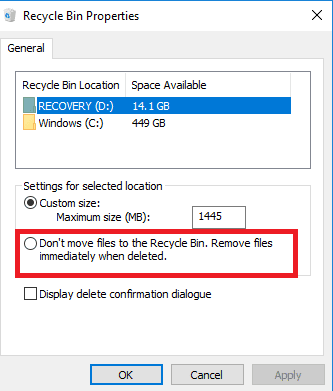
We select this option and click OK . This way, all files we delete from now on will not go to the Windows 10 Recycle Bin.
Use a key combination
The second option available allows us to delete a file directly from the computer. However, this option can only be used with one file at a time, so it's best suited for specific situations. To do this, select the file and hold down Shift + Delete . Alternatively, you can press Shift and right-click , then choose the delete option. A window will then appear confirming that the file will be permanently deleted.
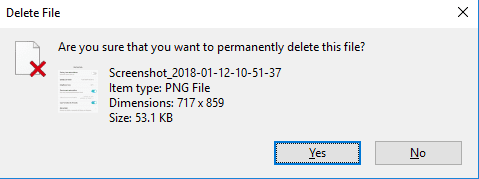
Doing this will cause the file to disappear completely . Therefore, you will never find it in the Windows 10 Recycle Bin.
These two options are methods that allow us to permanently delete files from our computer. However, we should only use them if they are things we truly don't need, otherwise we might make a mistake.
Table of Contents