

As you know, hard drives and SSDs have read and write speeds . This is a key piece of information for understanding how these components work, and it's also important for detecting potential problems or when considering replacing your current hard drive. Therefore, knowing this information is very useful.
Unfortunately, it's not always easy to find this information . To do so, we need to use software that will help us determine the speed of our hard drive or SSD. This way, we can always keep track of its read and write speeds.
IsMyHDOK is the name of a tool that helps us easily obtain this information . It's possibly one of the best available today. What's more, it's completely free . So, in addition to getting a quality tool, we get it for free. Thanks to it, we'll be able to find out the speed of our hard drive.
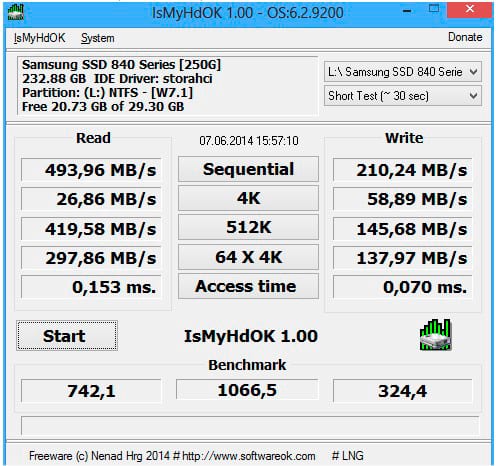
It's a lightweight and easy-to-use software that requires no installation . Using this tool, you'll get read and write speed information for your hard drive or SSD. You can also get it for your USB drive if you want to know that data.
As for its operation, IsMyHdOK is very easy to use. The interface is very simple and intuitive , as you can see in the image. Furthermore, it displays all the information clearly, so you won't have any problems using this tool. It has a drop-down menu where you can choose the drive whose speed you want to know.
It offers four ways to check the speed : quick, short, long, or very long. Simply select the one that suits your needs. The longer methods provide a more accurate reading, although the quick ones work well and are reliable. Once you've selected the mode, just wait for the results. As you can see, IsMyHdOK is a good way to check the speed of your SSD or hard drive.