

Major updates, such as the Windows 10 Anniversary Update, can sometimes cause parts of the system to malfunction or result in minor errors or performance issues. For this reason, Microsoft has released the update in phases to address any bugs that may arise.
One of these errors is the inability, for some users, to launch the NVIDIA Control Panel , which instead displays a blank, empty window. This is because Windows Update thinks your NVIDIA graphics card driver is up to date, but it isn't. We'll show you how to fix the control panel issue and manually update the driver so you can resolve the problem.
How to fix NVIDIA control panel in Windows 10 Anniversary Update
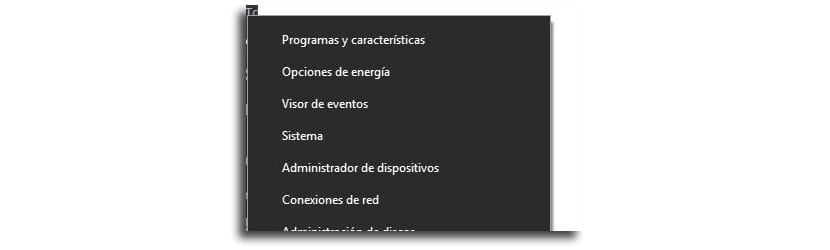
- We right click on it windows start button
- We seek Device administrator and we launched it
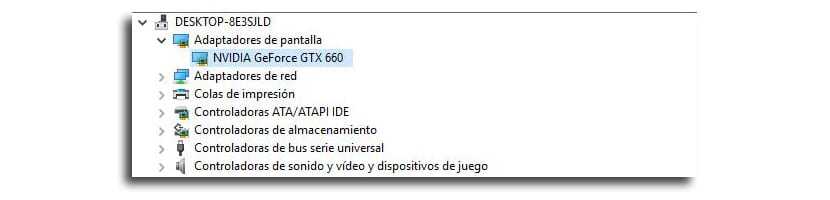
- We double click on Display adapters
- Now double click again on your Graphic card (in my case the GTX 660)
- We go to Controller tab at the top of the window

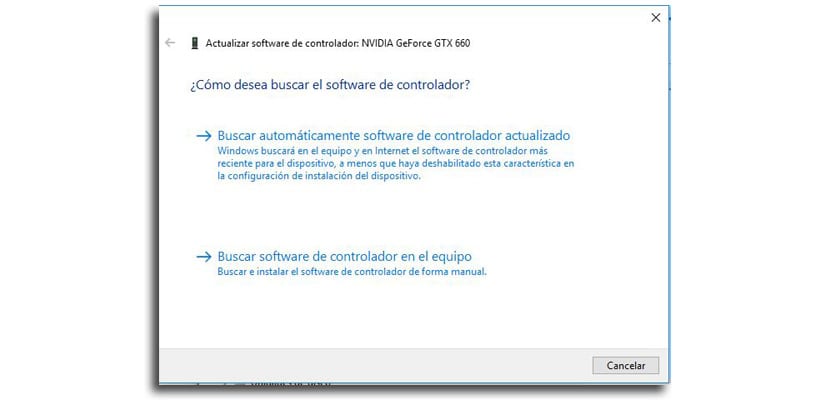
- Click on Update Driver
- Now will be the time to click on "Search automatically for updated driver software". Windows will search and download the latest version of the graphics driver
- We close when the download and installation is done
- We press on the X in the upper right corner of Device Manager
- Now we press «Yes» to restart the computer so that the driver files are installed correctly
Now that we have the fully functional control panel again, thanks to the latest version installed. However, we don't expect this error, which some users are experiencing, to be fixed soon.
