

When you want to change your profile or bio on Instagram, the social network only offers one default font. This isn't a problem, but some users might prefer a different font to give their profile more personality. In these cases, there are alternative options that allow you to use any font you want in your Instagram bio.
But we have to resort to third-party options. Because Instagram itself doesn't offer this possibility, at least not at the moment. However, you'll see that the process isn't too complicated and will allow you to easily change the font used in your social media bio .
This can be a useful option for many users who want a more interesting, original, or eye-catching profile . It's especially helpful for people who want to gain followers, whether to promote a business, products, or their talent in a particular area. Therefore, using a different font in your social media bio can be a good idea.

In this regard, you can use a website that gives you easy access to new fonts . This way, you can use the one you want in your Instagram profile. It's just a matter of finding a website that suits your needs. There are good options; a Google search will yield results. But we've selected one website for you.
Change font on Instagram
The website in question is LingoJam, which you can visit at this link . It's not too complicated. It's a website that generates the font you want to use for your Instagram profile . They have a huge selection of fonts available, many more than other websites. So it'll be hard not to find one that interests you.
You'll see two boxes on the website. In the first one, you'll write the text you want to use for your Instagram profile . It can be anything you like, but it should align with the purpose of your profile on the social network. Therefore, if you're looking to gain followers, there are some tips to follow. It's important to clearly state what you do or what you want to achieve. So, if you have a business, include the name and something that defines the business or what it does, such as the products you sell. If it's an artist profile, say something about what you do and you can mention some of the projects you've completed.
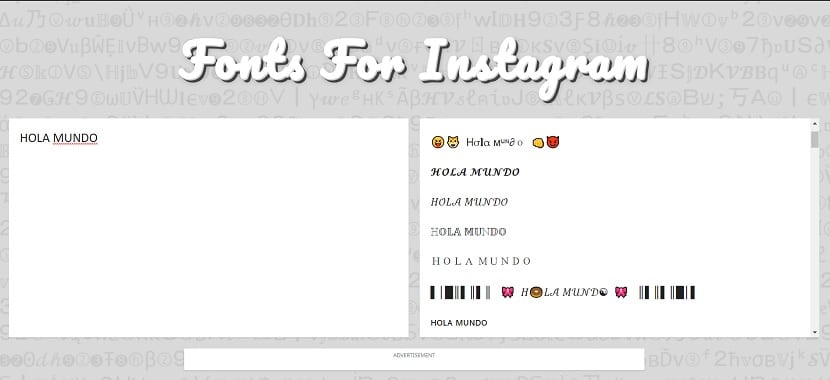
Then, you type what you want in that box. In the other box, once you've typed your text, you'll see a huge selection of fonts . You can click on the one you want, and you'll see that your text is applied in that font. It's best to try out several to see which one looks best on your Instagram profile. So, the next step is to choose your font from the many options available.
Next, once you've chosen the font, you'll see an option to copy the text from the website. Select the text, and a copy option will appear at the top. Copy the text and then go to your Instagram profile. Go to "Edit Profile ," where you can modify your bio text. There, simply paste the text you just copied to your clipboard. It will be pasted using the new font you used.
By following these simple steps, you'll have a different font in your Instagram bio . A great way to easily stand out from other profiles on the social network.