

Many users want to customize Google Chrome. That's why the popular browser's extension store offers themes. These themes allow us to personalize the browser's appearance. However, the current selection isn't particularly large. Fortunately, there are other ways to achieve this.
Since users are offered the option to create their own themes for Google Chrome , it's not too complicated. This means the Google browser will always have the appearance the user prefers, which could be ideal for many people.
This method for creating browser themes is really easy. With just a couple of clicks, you can have your own theme to use in Google Chrome. This way, you can have a new theme or change your browser's theme whenever you want. Something that will surely be very interesting for users who like to constantly change the appearance of their browser.
To carry out this process, there's a website. Thanks to it, you can automate this process to the fullest extent possible. It's called ThemeBeta, and you can use it directly on the web . But for those interested, it also has a Google Chrome extension that can be easily installed. So both options are available, although using it directly on the web is much simpler.
Own themes for Google Chrome
On this website, you can upload any image you like. You'll then be able to edit it however you want. This means you can easily customize the colors and interface to your liking. You can also select the colors generated by the image. In short, you're provided with many tools to fully personalize the appearance of Google Chrome.
To do this, go to ThemeBeta at this link . On the website, upload a photo saved on your computer to use as your browser background . You can use any photo you like, as you'll have the option to adjust it later. So, it doesn't matter if it's dark or very bright. It won't affect how you use Google Chrome on your computer.
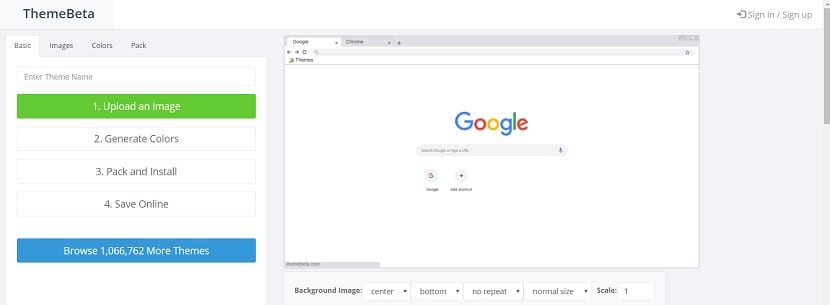
When you upload a photo, the website detects its colors and generates an appropriate theme. This ensures the colors look good and everything harmonizes with the browser's new appearance. It's really easy to set up a theme. However, users are always given the option to adjust anything they don't like.
Everything you do on the website can be saved online, as this site has built a huge user community. Because of this, there are so many Google Chrome themes available. All of these themes, currently over a million , have been created by members of this community. So, if you find one you like, you can use it without any problem, as they are completely free.
If you're thinking about customizing your Google Chrome theme, this website is definitely a great option to consider. You can create your own fully personalized themes, and you'll also have access to a much wider selection of existing themes—many more than in the browser's store. Don't miss this website; you can find it at this link.