

Facebook is a social network known for generating a large number of notifications . We tend to receive notifications on the site for all sorts of actions. While this can make it convenient, it ends up being annoying for many. The good news is that we can manage these notifications on the social network to our liking.
This means we can disable some of the notifications on Facebook. This way, we only allow the ones that are relevant to us to function. This allows for better use of the social network , resulting in fewer notifications and therefore less irritation.
The social network itself is working on a change to its notifications for the future , aware that the current notifications are more of a nuisance than a help to users. But for now, there are no dates set for the release of these new notifications. So, for the time being, we have to manage them ourselves. We can do this from our social network account at any time.

Manage notifications on Facebook
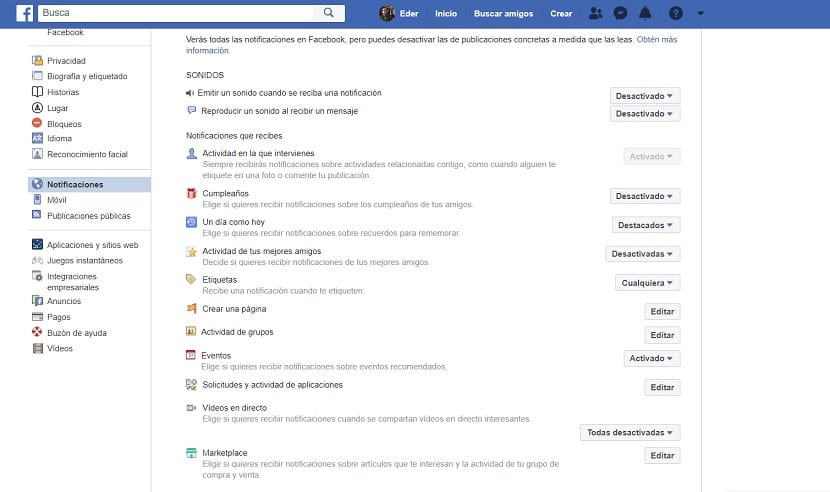
First, we need to log into our Facebook account using a web browser on our computer. We can also do this from our smartphone account, but it's more convenient to manage this on a computer. Once logged in, we need to click on the down arrow in the upper right corner of the screen. A context menu with several options will appear; we click on the settings option.
Within the settings, we look at the left side of the screen. There we have a column with various sections, one of which is notifications . We click on this section, and then the Facebook notification options appear in the center of the screen. Now we can begin managing these notifications on our account. We'll see that there's a fairly long list on the screen.
Facebook generates notifications based on all kinds of actions and activities. In this list, we can choose which notifications we want to receive and which we don't , making them much easier to manage. We simply activate and deactivate the notifications we deem appropriate, tailoring them to our specific use of the social network. We should also pay attention to the sound option, as the social network can send notifications with sound, which may not be to everyone's liking.