

Google Maps is a website and app that we use regularly . We can use it frequently to plan our routes at any time, so we can get a lot out of it. When we use it, we usually enter the name of a place. However, in the app, we can also use coordinates to find places or plan routes.
How to use coordinates in Google Maps is something that often causes confusion among users. Therefore, below we show you how to use them on the web or in the app; it works the same way in both versions. So, if you want to use them, you'll be able to.
How coordinates are used in Google Maps
A crucial detail when using coordinates in this service is their format . Google Maps requires them to be entered in a specific way, and any other format will prevent them from working correctly. The website allows you to enter these coordinates in three different ways. The following methods are available:
- Degrees, minutes and seconds (DMS):
41°24'12.2"N 2°10'26.5"E - Degrees and Decimal Minutes (DMM):
41 24.2028, 2 10.4418 - Decimal degrees (DD):
41.40338, 2.17403

Any of these three methods will be useful when entering coordinates on the website or in the app. It's important to use one of these methods, otherwise you won't get the expected result. Furthermore, the Google Maps support website offers some tips to keep in mind when using coordinates to ensure everything runs smoothly:
- Use the degree symbol instead of using the letter "g"
- It is recommended to use points for decimals instead of using commas. The best way is therefore like this:
41.40338, 2.17403. - Write the latitude coordinates first and then the longitude coordinates
- Check that the first number of the latitude coordinate is always a value between -90 and 90
- Check that the first number of the longitude coordinate is always a figure between -180 and 180
How to enter the coordinates
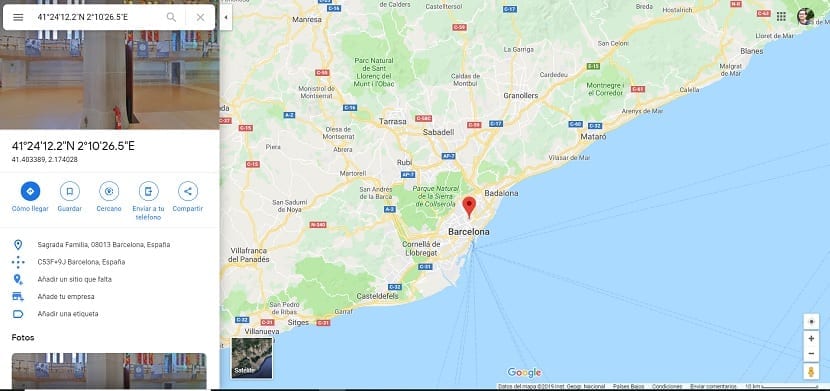
Once we're clear on the format we need to use in Google Maps and have paid attention to Google's advice, we can start searching for or entering those coordinates. First, we'll need to open either the Google Maps app or website on our computer. The process is the same in both cases.
In the Google Maps search bar, we need to enter the coordinates we want to search for. We can do this using one of the formats mentioned in the previous section. Once we've entered the coordinates, we simply press Enter or click on the magnifying glass icon. This will perform the search. Then, in a few seconds, we'll see a location on the map corresponding to those coordinates.
It's possible that Google Maps will show us the point on the map corresponding to those coordinates , but won't display the exact name of that place. However, it's common for the address or a name to be shown in the description of the location, which we can see on the left side of the screen. This way, we can determine if it's what we were looking for. Therefore, we can then identify the specific location to which those coordinates we searched for in the app belong. But if you have any doubts, you can always check the map to see if it has directed you to the place you actually wanted to go.
This way we've been able to use the coordinates in Google Maps . As you can see, it's not complicated at all. The only thing is that you have to pay attention to the format.