

Email has remained the primary communication method for internet users for over two decades. While numerous alternatives have emerged, most notably instant messaging, email continues to be the most formal option. One of the pioneering services in this field is a Microsoft product that has undergone numerous changes but remains relevant. Therefore, we'll show you how to recover a Hotmail account if you're unable to access it.
This is really common, considering that Hotmail accounts have been somewhat deprecated since the appearance of Gmail. However, it's important to know how to log back in if you need to retrieve old files or mail.
What do I need to recover my Hotmail account?
Nowadays, email services have various mechanisms designed to facilitate account recovery . This is due to the different reasons why you might lose access to your email, ranging from forgetting your password to being hacked.
To easily recover your Hotmail account , it's essential to have previously set up a recovery email address or phone number. If you haven't done this, you'll need to prove ownership of the email address. You'll receive an email from Hotmail with instructions to follow. If you do this correctly, you'll be able to log back in.
Outlook offers three possible methods for those looking to recover a Hotmail account. It's worth noting that you can follow the same steps for all domains within Microsoft's email service: Outlook, Live, and Hotmail.
How to recover my Hotmail account?
If you want to know how to recover your Hotmail account, follow the steps that we present below:
Enter the recovery page

The first step in this process is to access the account recovery wizard offered by Outlook. To do this, follow this link and enter the address you want to access again.
Choose a recovery method

Next, we'll select your account recovery method. The available options depend on whether you previously configured them, and there are two: your alternate email address and your phone number . These are the methods email services have adopted to ensure a simple process for users to regain access to their accounts.
In both cases, you'll receive a code to verify your ownership of the account, and you'll immediately be able to create a new password . However, if you haven't set up either of these methods, you'll need to click the "I don't have any of these proofs" link.
Fill out the form
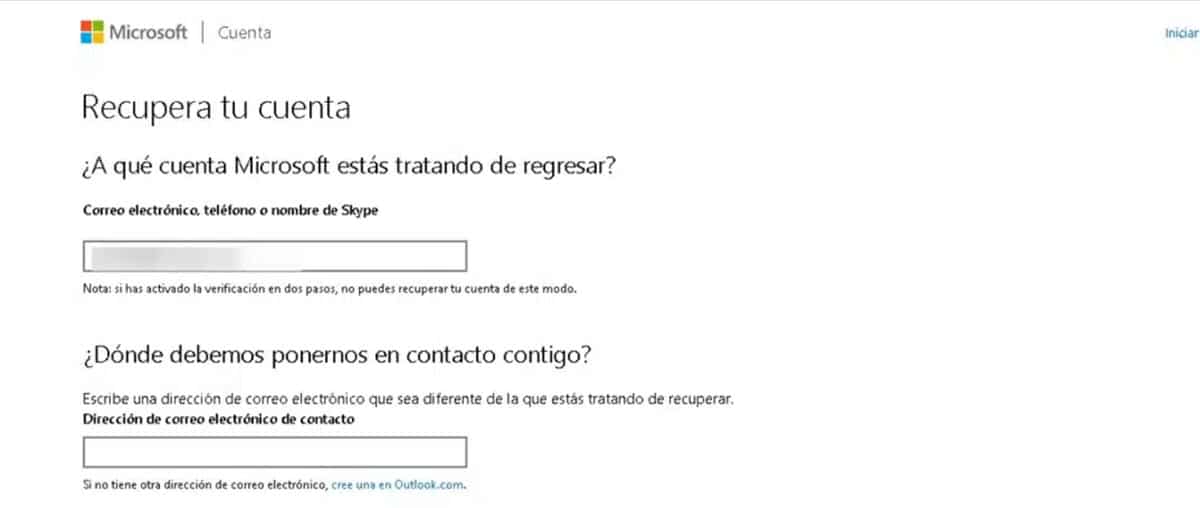
Clicking the link indicating you don't have any of the suggested proofs will take you to a form requesting an alternate email address and the one you want to recover . The idea is to send you a link to that address with a series of steps where you'll need to prove you own the email account you want to recover.
Upon successfully completing this step, you will proceed directly to creating a new password for your inbox . Once you have done this, set up a recovery phone number and email address to facilitate future access.
How to prevent the loss of my Hotmail account?
Generally, users looking to recover a Hotmail account do so because they have old emails . It's worth noting that Hotmail was one of the pioneering services in this field at the beginning of the 21st century and was the most popular alternative, just as Gmail is today. Therefore, remembering the password we used back then can be difficult.
However, it's crucial that when you regain access to your account, you configure everything necessary to prevent losing it again . Therefore, your first action should be to set a strong password that you can easily remember. If you're a Chrome user, we recommend using its password manager. Additionally, set up a recovery email address and a phone number to receive verification codes.
Additionally, try to access your email only on devices you own or know . If you do access it on other devices, always remember to log out or delete the account. Similarly, another good security practice to prevent losing your Hotmail account is to avoid downloading and running files from unknown senders. Doing so on your mobile phone or computer can compromise the integrity of your data and access to your email.
Taking these recommendations into account, it is most likely that you will not have to use the Hotmail account recovery mechanism.
Table of Contents